
EMR
(Electronic Medical Records)
 |
| Version
E - Operational since 2011
|
|
AVAILABLE FOR DOWNLOAD NOW! NEW!
To download Click Here |
New Features and Improvements:
Click here for the boring details
|

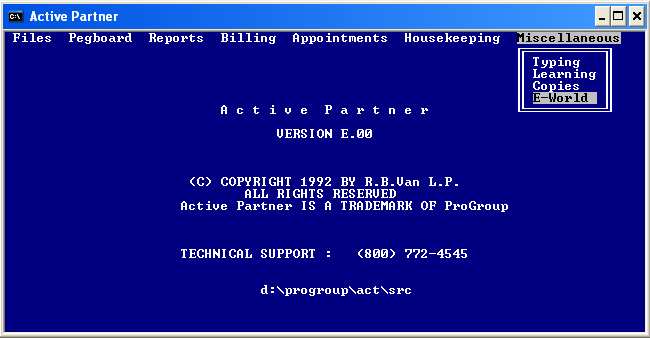
New Active Partner non-graphical screen with E-World menu item
|
(Included
in Version E)
E-WORLD is a utility, integrated and included in the update to let you connect and "talk" to the E-lectronic world. With it you can send or view error logs, and send billforms or other files to ProGroup. You can send e-mail to anyone. And you can connect with ProGroup's webpage to request support, download files or see what's new. Of course you have to be connected to the internet for it to work. The next version will probably show e-mail messages from ProGroup. This is all in preparation to let you send bills or letters directly to your patients' e-mail accounts. And, since you'll be connected, we can log onto your computer (only with your permission) and see what you're seeing or help you with something that is easier to do than tell you what to do. This "E" in electronic was the inspiration for calling this update Version "e"
e-World Menu Screen
|

|
(Included
in Version E)
We made a Support Utilities program - outside of your office program to help us give you better support. It's a very handy way to do an unlock, go into the "grey bar" internal techincal support area, go to a system prompt without having to search for where we should be, search for all instances of ProGroup software on your computer, view and send error logs, request remote support, access all the E-world functions, send us e-mail, and for Active Partner, switch between graphical and non-graphical menus.  Support Utilities Screen |
|
(Included
in Version E)
Sometimes its easier for us to fix something than to tell you how to do it. Other times, you might want to show us something on your screen. This is now as easy as can be. Or, (save me!) I could say .. "as easy as pie! (in the SKY!) Simply click the ProGroup Utilities and press "R" + enter (for remote). A box will come up asking for the "Session ID" (which you will get from us) and your name. That's all! It's that easy! Now, we can see what you see and fix things while you watch. Remote Support! Take advantage of it! ... to make your life easier! |
|
(available with Version E and the COMPLETE support and Professional Office support) This is the ultimate way to bill insurances. Press ONE key and walk away. DO NOTHING MORE! In no time at all, every unbilled insurance charge will have been sent by internet, into the cloud (BLUE SKY), and on to the processing companies. The electronic billing transmission meets the current HIPAA requirements for encryption, guaranteing patient privacy. A backup of the billing is automatically copied to a backup directory on your computer, where it will be stored. If uneeded in 30 days, it is automatically deleted to keep your computer clean.
You will be able to configure the billings to go out by clinic name or provider name and also choose whether they should be billed under the Primary Provider or the Treating Provider. Requirements for this add-on are an internet connection and an e-mail address. If you don't have an e-mail address, we'll give you one or order BLUE SKY (see below). You can order one or the other or both. Subscribe to Complete - here |
|
You may have noticed our new website and domain name. We chose the picture because it has so much blue sky (and because retiring to a tropical paradise is many peoples' dream!). Perhaps you've heard about "cloud computing"? It refers to data storage in the "cloud" - a term used by Microsoft. But remember, Microsoft is near Seattle. In Seattle when you look at the sky you see clouds. We're in Panama some of the time, and when we look up we see mostly BLUE SKY. So.... we're calling our online storage BLUE SKY or SKY-ber Space (like cyberspace, but less cloudy!) When we offer you "Blue Sky, we aren't trying to sell the Brooklyn Bridge or smoke! We're offering a real place to store your data! Some place away from your house and away from your office where it will more likely stay safe.  "SKY-ber Space" is a monthly subscription that includes unlimited e-mail addresses with POP, IMAP and SMTP e-mail and webmail to access your e-mail from anywhere (home, office, or on the beach in Cancun), a free e-mail client if you want (very small and perfect for your travel computer), unlimited storage space, unlimited bandwidth, unlimited subdomains for your own (personal or business) webpages, an FTP account, unlimited backup areas with unlmited backup space - backup your ProGroup software and data, your personal data, your pictures etc, etc, etc.... AND, if you want, mirror your data from your computer to your SKY-ber Space, keeping constantly updated backup data, offsite where it can't burn up in a fire or be stolen from your office. You'll never again have to worry about staff accidentally neglecting (forgetting?) to make backups and leaving you and your business vulnerable. Have your cake and eat it too with our P.I.E. in the SKY (P.rogram I.nternet E.xchange). But, you must have your office computer connected to the internet for it to work. Subscribe to BLUE-Sky - here |
| ANSI 5010 837-P* data support The Health Insurance Portability
and Accountability Act of 1996 (HIPAA)
requires
billing with the new 5010 837-P format. This format is mandated for use
by January 1, 2012. We are changing our Data Entry Screens in
"Patient Information" and elsewhere to quickly and conveniently collect
additional and different data required for 5010 837 submittals through
your clearing house.
Updated data screens New data collected, stored and editable Increased diagnosis field lengths to accept the new 14 digit ICD-10CM codes. Increased number of diagnoses linked to specific procedure performed Increased field lengths to accept new ICD-10PCS procedure codes. * Version E is required for this version to function (free
to Complete and Professional Offices)
|
We know that we've given you a lot of choices. If this all becomes too confusing, just call and we'll help sort it out.
305-515-8486 - leave a message and we'll call you back. OR send a message here


Recognizing Bright Ideas!